Neon Hockey
Instructions:
Game Controls LEFT CLICKDescription
Neon Hockey In-Depth Review and Guide
Glowing Tabletop Competition
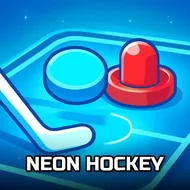
Neon Hockey recreates the fast, satisfying rhythm of tabletop air hockey inside a glowing, brightly lit visual style that gives every match a distinctly vibrant arcade feel. The one-player mode against a computer opponent provides a solid warm-up for practicing paddle control, while the two-player option turns the format into a genuinely competitive showdown between two people sharing the same screen. This flexibility between solo practice and head-to-head competition gives the format lasting appeal for both casual players and those looking for genuine bragging rights against a friend.
Controller & Keyboard Guide
- Use the left mouse button to control your paddle's movement on the table.
- Move the paddle to intercept the puck before it reaches your goal.
- Strike the puck at an angle to send it toward the opponent's goal.
- Switch between one-player and two-player modes from the main menu.
Score-Boosting Tactics
- Stay centered near your goal rather than chasing the puck across the whole table.
- Strike the puck with a deliberate angle rather than a straight, predictable shot.
- Watch your opponent's paddle position to anticipate their next move.
- Practice against the computer before challenging a friend in two-player mode.
Fans of quick competitive matches will likely appreciate having both solo and head-to-head options available. The overall structure rewards precise paddle control over relying purely on reflexes. Fans of quick tabletop competition will find plenty to enjoy here. Its bright, glowing visual style also gives every single match a lively, energetic atmosphere that plain tabletop hockey games usually lack.